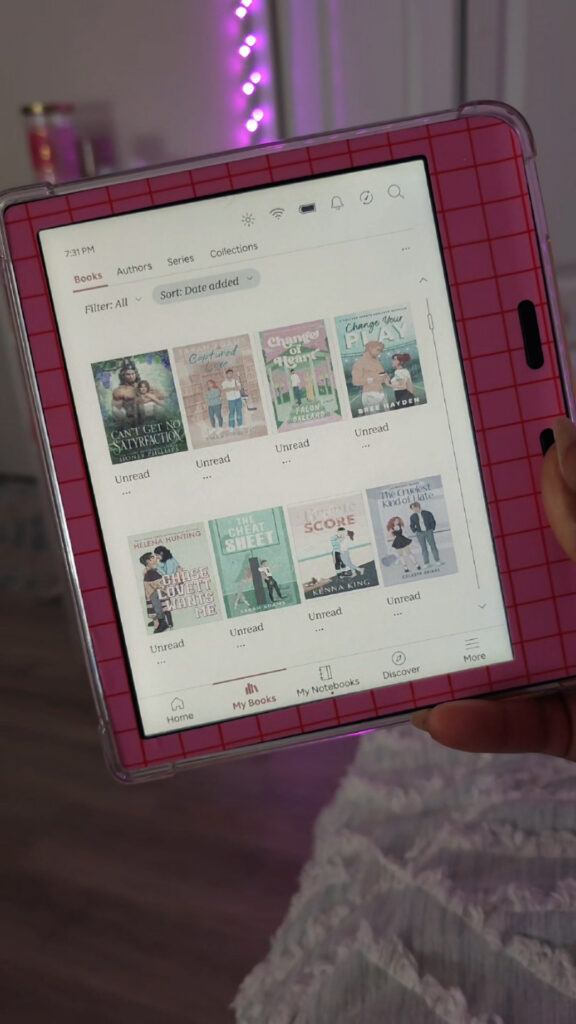
A lot of you have been switching over to Kobo lately, and once the excitement of a new e-reader wears off, two questions always come up: how do you decorate it, and how do you actually keep your library organized without it turning into a mess? As an aesthetic Kobo girlie myself, I’ve got answers to both. Here’s my full setup, plus the method I use in a free app called Calibre to keep hundreds of books organized, trackable, and genuinely cute to browse.
As an Amazon Associate, I earn from qualifying purchases. This post contains affiliate links, which means I may earn a small commission at no extra cost to you if you make a purchase through one of these links.

Watch the full video below, then keep reading for the full breakdown.
Watch the Video
My Aesthetic Kobo Setup
Before we get into organizing, a peek at the decor. My Kobo Libra Colour has a pink “granny chic” skin decal from my Etsy shop, plus a set of BAN.DO stickers I picked up on sale at Barnes & Noble, and a tiny cat charm from Temu. My home screen sleep screen is a Pinterest find I resized in Photoshop to read “Abbigayle’s Kobo Library,” in a soft pink and green theme. None of this is required to organize your library, but it’s the fun part, and it makes the whole device feel like yours before you even open a book.
Why Kobo’s Default Views Aren’t Cutting It
Here’s the problem: out of the box, Kobo really only gives you cover view or list view. Cover view looks cute at a glance, but once your library grows past a handful of books, it turns into one giant, unlabeled pile of covers you can’t actually search through. List view fixes the missing titles, but let’s be honest, nobody finds list view aesthetic. Sorting by author is an option too, but it still doesn’t help you browse by what you’re actually in the mood to read. None of Kobo’s built-in views solve “aesthetic” and “easy to find a book” at the same time, which is exactly the gap Calibre fills.
The Aesthetic Fix: Organizing by Series in Calibre
My favorite method is putting every single book into a series inside Calibre, even books that aren’t officially part of one:
- For books that are part of a real series, I enter the actual series name and book number.
- For standalone books, I still give it a “series” using the book’s own title, so every book in my library ends up sorted the same way, whether it’s book four of ten or a total one-off.
- Once every book has a series entered and I sync my Kobo, everything shows up grouped and numbered in series view instead of one big pile.
I also use color coding in Calibre so anything I’m planning to read next automatically shows pink, and anything I’ve already finished switches to green. That way, the second I plug in my Kobo, I can see my whole “up next” list at a glance without digging through my entire library.
Keep in mind, this only works for books that actually have a series entered, so there is some upfront time involved going through your existing library and adding one (even just the book’s own title) to anything that’s missing it.
Bonus Method: Tags & Collections
If series aren’t your thing, Calibre also lets you build collections using its tags feature. Every tag becomes a collection on your Kobo, and a book can live in multiple collections at once, similar to Kindle. I’ve got a “sports” collection and a more specific “hockey” collection inside it, for example. The one downside is collections show up as a plain list with no cover art, so for a purely aesthetic library, series view still wins for me.
Keeping It Consistent
If you’re moving books over from Kindle like I did, a couple of things to expect: covers can look mismatched since Kindle books aren’t sized for Kobo, so you may want to spend some time in Calibre adjusting cover sizing for a cleaner look. You can also swap out any covers you don’t love (goodbye, random shirtless-guy romance covers) for something that better matches your aesthetic.
One more nice touch: books you’ve borrowed through Libby or OverDrive stay in your Kobo library, cover and all, even after the loan is returned, so your reading history stays intact.
Final Thoughts
Between a cute skin, a personalized sleep screen, and a Kobo library sorted by series in Calibre, it’s genuinely possible to have an e-reader that’s both aesthetic and actually easy to use. A little upfront organizing goes a long way toward making your whole library feel curated instead of chaotic.
If this helped you set up your own aesthetic Kobo, give the video a thumbs up and subscribe to Abbi’s Digital Nook for more Kobo, Kindle, and bookish content. See you in the next one!
Shop the post!
Shop The Post